NDI PTZ Control1.0.5
Publisher Description


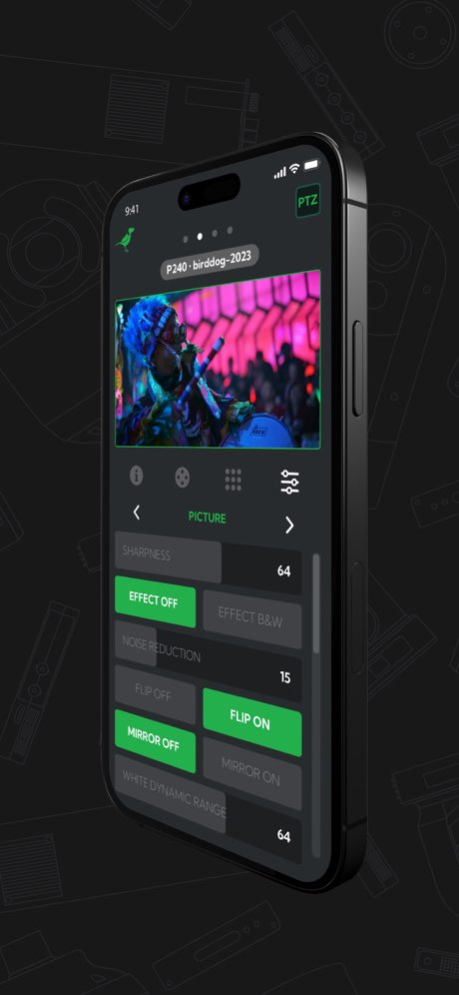
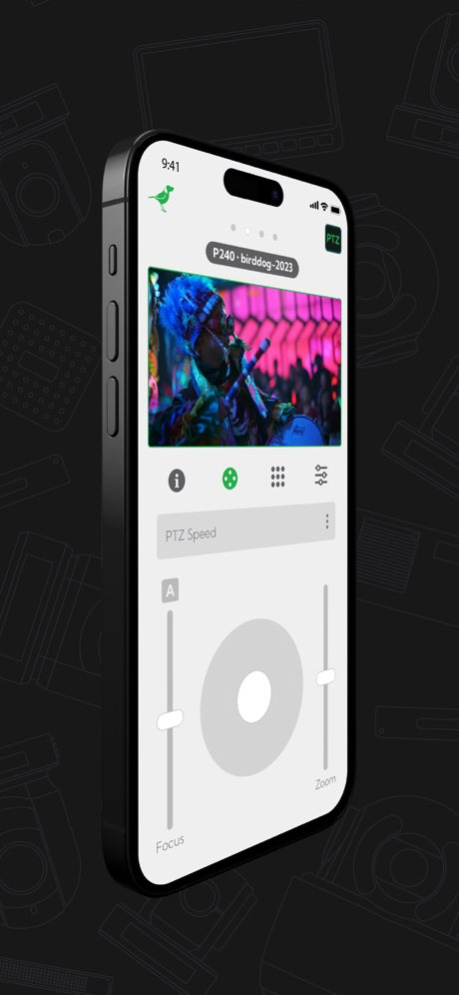
NDI PTZ Control is the ultimate iOS app with support for all NDI PTZ regardless of manufacturer. Featuring full Pan, Tilt, Zoom control including a live joystick, and save and recall pre-set PTZ positions. The inbuilt viewing monitor allows viewing of any NDI, NDI HX2, and NDI HX3 source in full screen.
NDI PTZ Control becomes even more powerful for BirdDog PTZ Camera users with Cam Control built in to access all the Colour Matrix tools to shade your BirdDog PTZ camera.
All this from an iPad or iPhone.
Version History Support for X1/X1 Ultra cameras (X4 Ultra/X5 Ultra/Maki Ultra coming soon)
Support for Generic NDI camera control
Added Safe action/Title borders
Improved P/T movement
Improved performance and stability 1.0.5 10/01/2024 Enhanced performance and stability. 1.0.4 01/11/2024 - Support BirdDog X120 camera
- Performance improvements and bug fixes 1.0.3 10/27/2023 - Added NDI Groups / NDI Discovery Server / Remote IPs support
- Added source filter
- Under the hood performance and stability improvements 1.0.2 05/31/2023 - Minor UI improvements
- Improved screenshots 1.0.1 04/28/2023 1.0.0 04/15/2023
About NDI PTZ Control
The company that develops NDI PTZ Control is BirdDog Australia PTY LTD. The latest version released by its developer is 1.0.5. This app was rated by 1 users of our site and has an average rating of 5.0.
To install NDI PTZ Control on your iOS device, just click the green Continue To App button above to start the installation process. The app is listed on our website since 2026-10-13 and was downloaded 23 times. We have already checked if the download link is safe, however for your own protection we recommend that you scan the downloaded app with your antivirus. Your antivirus may detect the NDI PTZ Control as malware if the download link is broken.
How to install NDI PTZ Control on your iOS device:
- Click on the Continue To App button on our website. This will redirect you to the App Store.
- Once the NDI PTZ Control is shown in the iTunes listing of your iOS device, you can start its download and installation. Tap on the GET button to the right of the app to start downloading it.
- If you are not logged-in the iOS appstore app, you'll be prompted for your your Apple ID and/or password.
- After NDI PTZ Control is downloaded, you'll see an INSTALL button to the right. Tap on it to start the actual installation of the iOS app.
- Once installation is finished you can tap on the OPEN button to start it. Its icon will also be added to your device home screen.
Program Details
System requirements
Download information
Pricing
Version History
version 1.0.5
posted on 2026-10-13
Version History Support for X1/X1 Ultra cameras (X4 Ultra/X5 Ultra/Maki Ultra coming soon)
Support for Generic NDI camera control
Added Safe action/Title borders
Improved P/T movement
Improved performance and stability 1.0.5 10/01/2024 Enhanced performance and stability. 1.0.4 01/11/2024 - Support BirdDog X120 camera
- Performance improvements and bug fixes 1.0.3 10/27/2023 - Added NDI Groups / NDI Discovery Server / Remote IPs support
- Added source filter
- Under the hood performance and stability improvements 1.0.2 05/31/2023 - Minor UI improvements
- Improved screenshots 1.0.1 04/28/2023 1.0.0 04/15/2023
version 1.0.5
posted on 2024-10-01
Support for X1/X1 Ultra cameras (X4 Ultra/X5 Ultra/Maki Ultra coming soon)
Support for Generic NDI camera control
Added Safe action/Title borders
Improved P/T movement
Improved performance and stability
version 1.0.5
posted on 2024-10-01
Oct 1, 2024
Version 1.0.5
Support for X1/X1 Ultra cameras (X4 Ultra/X5 Ultra/Maki Ultra coming soon)
Support for Generic NDI camera control
Added Safe action/Title borders
Improved P/T movement
Improved performance and stability
version 1.0.4
posted on 2024-01-11
Jan 11, 2024
Version 1.0.4
Enhanced performance and stability.
version 1.0.3
posted on 2023-10-27
Oct 27, 2023
Version 1.0.3
- Support BirdDog X120 camera
- Performance improvements and bug fixes
version 1.0.2
posted on 2023-05-31
May 31, 2023
Version 1.0.2
- Added NDI Groups / NDI Discovery Server / Remote IPs support
- Added source filter
- Under the hood performance and stability improvements
